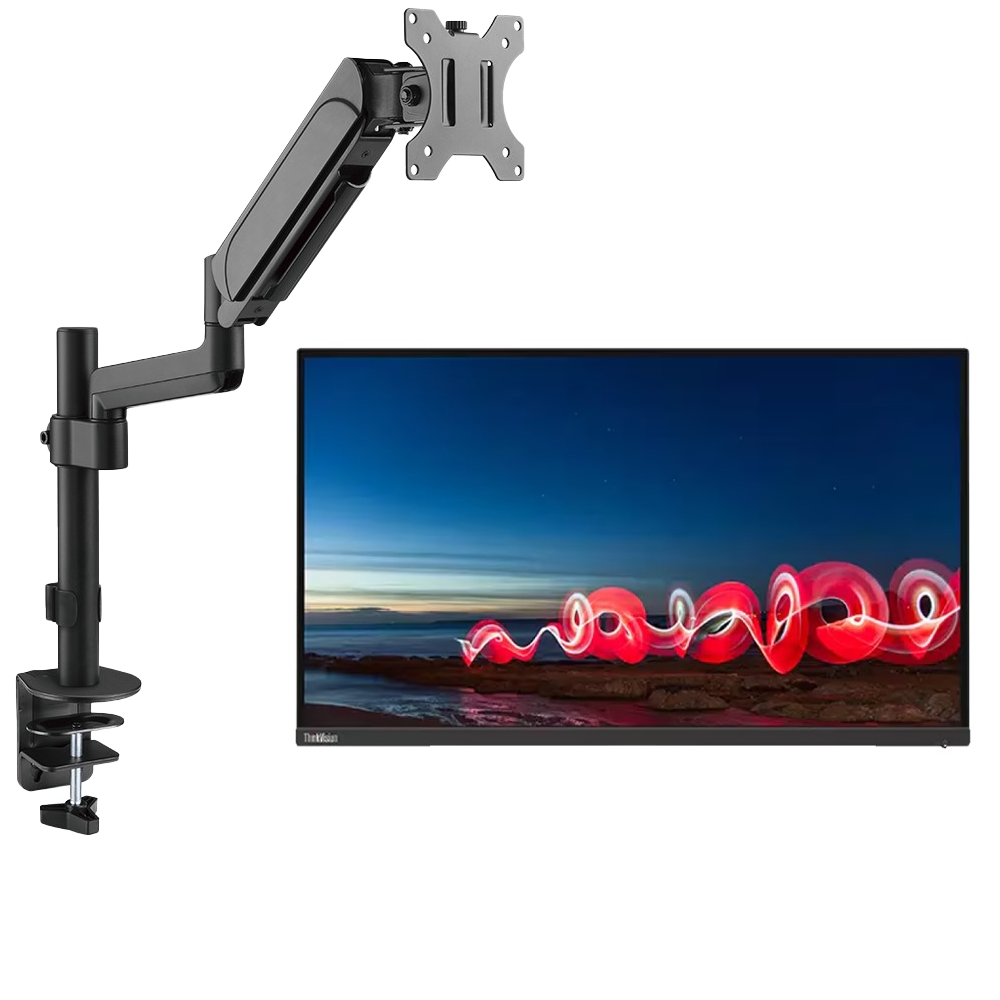
Lenovo ThinkVision T27h-30 27″ WQHD IPS 2560×1440 60Hz 4ms HDMI, DisplayPort, USB-C Monitor (Used) With MXG PMA-12 Single Monitor Pole-Mounted Spring-Assisted Monitor Arm

40,000.00

Out of stock

This product is currently sold out.

No worries! Enter your email, and we'll let you know as soon as it's back in stock.

Payment Methods:

zahcomputers payment methods

Highlights

  • Vivid Display: Features a 27-inch WQHD (2560 x 1440) IPS display with 16.7 million colors, 350 nit brightness, and 99% sRGB color gamut for clear visuals.
  • Rapid Response: Offers a 4ms response time and a 60Hz refresh rate, suitable for smooth visual experiences.
  • Ergonomic Adjustments: Includes a stand with height, tilt, swivel, and pivot adjustments, along with VESA mount compatibility for flexible setup.
  • Extensive Connectivity: Equipped with HDMI, DisplayPort, USB-C, and a 5-port USB hub, plus an RJ-45 network port for comprehensive connections.
  • Eye Comfort: Incorporates anti-glare, low blue light, and Eyesafe Certified Eye Comfort Technology to reduce eye strain during extended use.
  • Integrated Audio: Features built-in speakers for audio output, enhancing the multimedia experience without external devices.
  • Cables are not included with the used Monitors

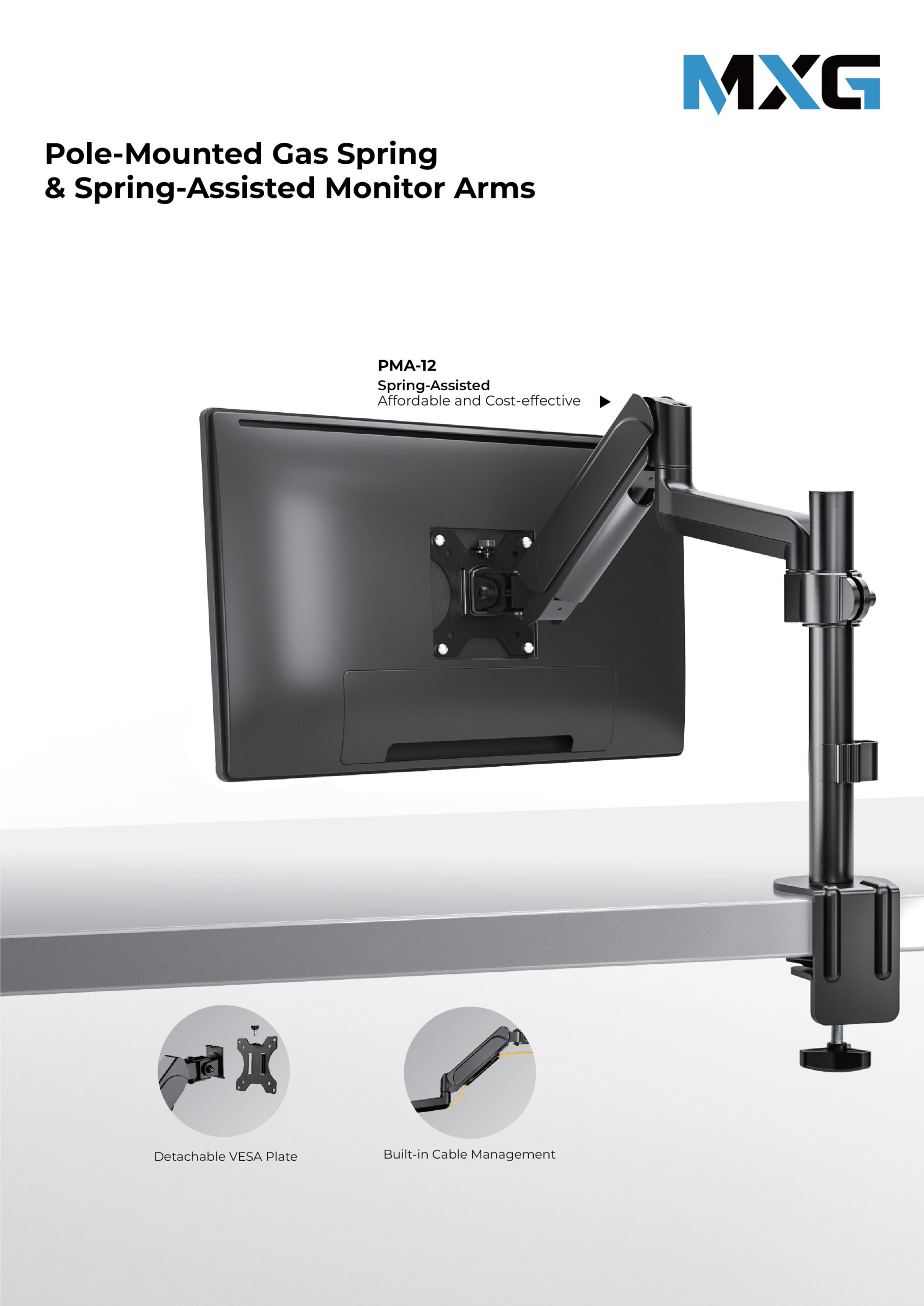
MXG PMA-12 Single Monitor Pole-Mounted Spring-Assisted Monitor Arm

  • Spring-Assisted Mechanism: allows to easily move up and down
  • 360° Rotary VESA Plate: for more viewing experience
  • Built-in Cable Management: for an organized and neat workspace
  • Space-Saving Design: free up and gain additional desktop work space

Download Manual MXG PMA-12


Frequently Bought Together

  • Lenovo ThinkVision T27h-30 27" WQHD IPS 2560x1440 60Hz 4ms HDMI, DisplayPort, USB-C Monitor (Used) With MXG PMA-12 Single Monitor Pole-Mounted Spring-Assisted Monitor Arm
  • Power Cord 3 Prong Hole Computer Cord Monitor Power Cable PC (Orginal)
  • Display Port Cable Original
  • USB C to USB C Cable (Original)
  • HDMI 1.4 Original
Total Price: 3,700.00
Warranty

3 Months

  • mappk We Deliver All Over Pakistan

We offer delivery services across Pakistan for your convenience. Here are the details of our shipping options:

  • Zahcomputers.pk1200 ZAH Express - Within 24 Hours

Place your order before 5 pm, and we will ensure same-day delivery within Karachi. This service is safe and reliable, providing you with a quick and efficient shipping experience.

  • leopard Leopards Courier

We also partner with Leopards Courier for deliveries throughout Pakistan. Here are the estimated delivery times for different scenarios:

  • Cash on Delivery (COD) Parcel Delivery to Other Cities: 2 to 4 days (COD parcels are not insured)
  • Non-COD Parcel Delivery to Other Cities - Over Land: 4 to 5 days
  • Non-COD Parcel Delivery to Other Cities - Overnight *48 Hours:

Expedited delivery within 48 hours Please note that the delivery times mentioned above are approximate and may vary depending on the location and other factors. We strive to ensure safe and secure shipping for all orders.
At ZahComputers.pk, we prioritize the safety and security of your packages to ensure a smooth delivery experience.

  • To claim a warranty issue, fill out the Return/Warranty Claim Form available on our website.
  • Defective or faulty products under warranty are sent to the distributor/vendor for repair, refund, or replacement based on their warranty policies.
  • Warranty claims will be rejected if the product has been physically damaged, incorrectly installed, or subjected to abuse.
  • Replacing faulty equipment is done after the official service agent confirms the warranty issue. The warranty process usually takes up to 20 working days to complete.
  • Warranty eligibility is applicable only to products with warranty information mentioned on the product page. Products without warranty information are not covered.

You can exchange any product purchased from ZahComputers.pk within 14 days of purchase under the following conditions:

  • The item(s) is faulty, damaged, or defective at the time of delivery (applicable for non-COD orders).
  • The item(s) does not match the original specifications or is different from what you ordered.

To raise a dispute, please notify us within 3-4 days of delivery by contacting our support team via email at support@zahcomputers.pk or by calling 021-32277661 or 0325 7033554. Each dispute will be evaluated on a case-by-case basis, and we strive to find a fair resolution for both parties.

For damaged items, it is essential to provide an unboxing video as evidence. Please email the video to support@zahcomputers.pk within 14 days of purchase to initiate the replacement process.

Returns:

If a product received does not match the description on our website, you have 7 working days from the date of delivery to claim an exchange or cancel the order. To initiate a return, the product(s) must be undamaged, unopened, and returned with all packaging materials and documentation.

Refund Policy:

If an order is canceled for any reason, the refund will be processed within 3 to 4 days. In the event that you are not satisfied with your purchase or there are certain circumstances where a refund is applicable, ZahComputers.pk offers a refund policy. To initiate a refund, please contact our support team at support@zahcomputers.pk or call 021-32277661 or Whatsapp: 0325 7033554 within the specified time frame.

Lenovo ThinkVision T27h-30 27″ WQHD IPS 2560×1440 60Hz 4ms HDMI, DisplayPort, USB-C Monitor (Used) With MXG PMA-12 Single Monitor Pole-Mounted Spring-Assisted Monitor Arm Price in Pakistan Specs

Brand Name of the company-manufacturer. Lenovo
Model Designation of the model. ThinkVision T27h-30
Model alias Other known designations of the model. 63A3GAR1
Model year The year in which this model was announced. 2022
 

Display

Information about the main characteristics of the display – panel, backlight, resolution, refresh rate, etc.

Size class Size class of the display as declared by the manufacturer. Often this is the rounded value of the actual size of the diagonal in inches. 27 in (inches)
Diagonal Approximate diagonal size of the display. If the manufacturer does not provide such information, the diagonal is calculated from the width and height of the screen. 685.655 mm (millimeters) 68.5655 cm (centimeters) 26.9943 in (inches) 2.2495 ft (feet)
Width Approximate width of the display. If the manufacturer does not provide such information, the width is calculated from the diagonal and the aspect ratio. 596.736 mm (millimeters) 59.6736 cm (centimeters) 23.4935 in (inches) 1.9578 ft (feet)
Height Approximate height of the display. If the manufacturer does not provide such information, the height is calculated from the diagonal and the aspect ratio. 335.664 mm (millimeters) 33.5664 cm (centimeters) 13.2151 in (inches) 1.1013 ft (feet)
Panel type There are various panel technologies. Each has its own specific features – viewing angles, color reproduction, response time, brightness/contrast, production cost, etc. The image quality depends directly on the type of the display panel used. IPS
Panel bit depth The most widely used panels are those with 6, 8, and 10 bits for each of the RGB components of the pixel. They provide 18-, 24-, and 30-bit color, respectively. 8 bits
Colors The maximum number of colors, which the display is able to reproduce, depends on the type of the panel in use and color enhancing technologies like FRC. 16777216 colors 24 bits
Aspect ratio The ratio between the horizontal and the vertical side of the display. Some of the standard and widely used aspect ratios are 4:3, 5:4, 16:9 and 16:10. 1.778:1 16:9
Resolution Information about the number of pixels on the horizontal and vertical side of the screen. A higher resolution allows the display of a more detailed and of higher quality image. 2560 x 1440 pixels Quad HD (QHD) / 1440p
Pixel pitch The pixel pitch shows the distance from the centers of two neighboring pixels. In displays, which have a native resolution (the TFT ones, for example), the pixel pitch depends on the resolution and the size of the screen. 0.233 mm (millimeters) 0.0233 cm (centimeters) 0.0092 in (inches) 0.0008 ft (feet)
Pixel density Information of the number of pixels in a unit of length. With the decrease of the display size and the increase of its resolution, the pixel density increases. 109 ppi (pixels per inch) 42 ppcm (pixels per centimeter)
Display area The percentage of the approximate area, taken by the active part of the screen, to the total front area. 89.8 % (percent)
Backlight The backlight is the source of light of the LCD display panels. The type of backlight determines the image quality and the color space of the display. There are various backlights such as CCFL, LED, WLED, RGB-LED, and etc. W-LED
sRGB sRGB is a color space, developed jointly by Hewlett-Packard and Microsoft in 1996. It is used in different devices such as printers, displays, TV sets, cameras, etc. The sRGB color space covers about 72% of the NTSC color space. 99 % (percent)
Brightness Information about the brightness of the screen. It is measured in candela per square metre (cd/m²). 350 cd/m² (candela per square meter)
Static contrast The static contrast shows the ratio between the brightest and the darkest color, which the display can reproduce simultaneously, for example, within one and the same frame/scene. 1000 : 1
Dynamic contrast The dynamic contrast shows the ratio between the brightest and the darkest color, which the display can reproduce over time, for example, in the course of playing a video. 3000000 : 1
Horizontal viewing angle Information about the maximum horizontal viewing angle, within which the image on the screen is of acceptable quality. 178 ° (degrees)
Vertical viewing angle Information about the maximum vertical viewing angle, within which the image on the screen is of acceptable quality. 178 ° (degrees)
Minimum response time Information about the minimum amount of time, in which the pixels change from one color to another. Very often the manufacturer provides the response time for transition from grey-to-grey (G2G). 4 ms (milliseconds) 0.0040 s (seconds)
Average response time Information about the average amount of time, in which the pixels change from one color to another. 6 ms (milliseconds) 0.0060 s (seconds)
Maximum response time Information about the maximum amount of time, in which the pixels change from one color to another. 14 ms (milliseconds) 0.0140 s (seconds)
Coating Information about the type of coating of the display. There are different types of matte and glossy coatings, each of which has its own advantages and drawbacks. Anti-glare/Matte
 

3D

3D displays use various technologies to achieve a 3D effect. Each of these technologies has its own advantages and drawbacks.

3D Information on whether 3D is supported or not. No
 

Frequencies

Information about the horizontal and vertical refresh rates/frequencies.

Vertical frequency (digital) The vertical frequency/refresh rate shows how many times in a second the image on the screen is refreshed. 60 Hz (hertz)
 

Power supply and consumption

Information about the power supply and consumption, energy efficiency class, etc.

110V Permissible voltage tolerance in a 110-volt electric system. 100 V – 120 V (volts)
220V Permissible voltage tolerance in a 220-volt electric system. 220 V – 240 V (volts)
Alternating current frequency Requirement regarding the alternating current frequency in the electric system. 50 Hz – 60 Hz (hertz)
Power consumption (off) Power consumption in off-mode. 0.3 W (watts)
Power consumption (sleep) Power consumption in sleep/stand by/suspend mode. 0.5 W (watts)
Power consumption (eco) Average power consumption in economy mode. 23 W (watts)
Power consumption (average) Average power consumption in standard work mode. 26 W (watts)
Power consumption (maximum) The maximum possible power consumption. 148 W (watts)
Power consumption (annual) Estimated power consumption per year in kWh. 71 kWh (kilowatt-hours)
 

Dimensions, weight and color

Information about the dimensions and the weight of the specific model with and without stand as well as the colors, in which it is offered to the market.

Width Width without stand in different measurement units. 613.6 mm (millimeters) 61.36 cm (centimeters) 24.1575 in (inches) 2.0131 ft (feet)
Height Height without stand in different measurement units. 363.5 mm (millimeters) 36.35 cm (centimeters) 14.311 in (inches) 1.1926 ft (feet)
Depth Depth without stand in different measurement units. 50 mm (millimeters) 5 cm (centimeters) 1.9685 in (inches) 0.164 ft (feet)
Weight Weight without stand in different measurement units. 4.8 kg (kilograms) 10.58 lbs (pounds)
Width with stand Width with stand in different measurement units. 613.6 mm (millimeters) 61.36 cm (centimeters) 24.1575 in (inches) 2.0131 ft (feet)
Height with stand Height with stand in different measurement units. 390.4 mm (millimeters) 39.04 cm (centimeters) 15.3701 in (inches) 1.2808 ft (feet)
Depth with stand Depth with stand in different measurement units. 204.5 mm (millimeters) 20.45 cm (centimeters) 8.0512 in (inches) 0.6709 ft (feet)
Weight with stand Weight with stand in different measurement units. 6.9 kg (kilograms) 15.21 lbs (pounds)
Box width Width of the package in different measurement units. 690 mm (millimeters) 69 cm (centimeters) 27.1654 in (inches) 2.2638 ft (feet)
Box height Height of the package in different measurement units. 525 mm (millimeters) 52.5 cm (centimeters) 20.6693 in (inches) 1.7224 ft (feet)
Box depth Depth of the package in different measurement units. 148 mm (millimeters) 14.8 cm (centimeters) 5.8268 in (inches) 0.4856 ft (feet)
Box weight Weight of the product with all accessories and packaging in different measurement units. 10.1 kg (kilograms) 22.27 lbs (pounds)
Stand depth Depth of the stand in different measurement units. 204.5 mm (millimeters) 20.45 cm (centimeters) 8.0512 in (inches) 0.6709 ft (feet)
Colors Information about the colors, in which the specific model is offered to the market. Black
 

Ergonomics

Information about the ergonomic functions – height adjustment, swivel angles, tilt angles, etc.

VESA mount Information about whether there is a possibility for wall mounting according to the VESA Mounting Interface Standard (MIS). Yes
VESA interface There are many various interfaces under the VESA standard, which differ in the size of the brackets, the distances between the screw holes and their number. 100 x 100 mm
Removable stand Information about whether the stand can be dismounted. Usually, this is required for wall mounting. Yes
Height adjustment Information about whether the stand allows height adjustment. Yes
Height adjustment range Information about the extent to which the stand allows the height to be adjusted. 155 mm (millimeters) 15.5 cm (centimeters) 6.1024 in (inches) 0.5085 ft (feet)
Landscape/portrait pivot Some displays have the ability to operate in landscape and portrait mode alike. Yes
Left pivot Degree of pivoting the display counterclockwise. 90 ° (degrees)
Right pivot Degree of pivoting the display clockwise. 90 ° (degrees)
Left/right swivel Information whether the display can be swiveled around the stand axis. Yes
Left swivel Maximum swivel degree of the display to the left of the stand axis. 45 ° (degrees)
Right swivel Maximum swivel degree of the display to the right of the stand axis. 45 ° (degrees)
Forward/backward tilt Most displays have the ability to be tilted forward and backward as to provide a more comfortable viewing position for the user. Yes
Forward tilt Maximum degree of forward tilting of the display. 5 ° (degrees)
Backward tilt Maximum degree of backward tilting of the display. 23.5 ° (degrees)
 

Camera

Many contemporary desktop monitors and smart TV sets have built-in cameras.

Camera Information whether the current model has a built-in camera or not. No
 

Network

Supported network technologies and standards for exchanging data with other devices.

Network Information about the network technologies and standards supported by the model, which allow for it to connect to and communicate with other devices. LAN
 

Connectivity

Available connectivity ports, slots and interfaces.

Connectivity Information about the available connectivity ports, slots and interfaces such as USB, infrared port, SD card slot, audio/video and network interfaces, etc. 1 x USB 3.2 (Type-C; Gen 1; upstream; 90W; DP Alt Mode) 1 x USB 3.2 (Type-B; Gen 1; 5 Gbps upstream) 4 x USB 3.2 (Type-A; Gen 1; 5 Gbps downstream) 1 x Ethernet RJ45 (1 Gbps) 1 x HDMI 2.0 1 x DisplayPort 1.4 (out) 1 x DisplayPort 1.4 (in) 1 x 3.5 mm Audio Out
  High-bandwidth Digital Content Protection (HDCP)
 

Features

Some additional functional features of the model.

Features Information about additional software features, technologies, functions and services of the model. 3-side borderless design Lenovo ThinkColor Natural Low Blue Light
 

Certificates, standards and licenses

Licenses from regulatory agencies, standards, certificates.

Certificates, standards and licenses List of the standards, certificates and licenses supported/received by the current model. CCC China Energy Efficiency Standard Tier 2 ENERGY STAR EPEAT Gold Eyesafe Display Certification RoHS (EU 2002/95/EC) TCO TCO Edge 2.0 TÜV Rheinland Eye Comfort TÜV Low Blue Light Certified (Hardware Solution) Windows Certification
 

Operating and storage conditions

There are certain requirements for the environmental conditions, in which the display should be used and stored in order to function properly.

Operating temperature The operating temperature shows the safe temperature range (from minimum to maximum), within which the display will function flawlessly. Outside this range it might operate improperly and/or fail entirely. 0 °C – 45 °C (degrees Celsius) 32 °F – 113 °F (degrees Fahrenheit)
Operating humidity The operating humidity shows the acceptable level of humidity, in which the display will function flawlessly. It sets a lower and an upper humidity level for safe operation and is measured in percentage. 10 % – 80 % (percent)
Operating altitude The operating altitude shows the maximum admissible altitude, at which the display will function flawlessly. Above this level it might not operate properly and/or might seize to function. 5000 m (meters) 16404.2 ft (feet)
Storage temperature The storage temperature shows the range from a minimum to a maximum temperature, within which storing of the display is considered to be safe. -20 °C – 60 °C (degrees Celsius) -4 °F – 140 °F (degrees Fahrenheit)
Storage humidity The storage humidity shows the lower and upper humidity limit, which ensures safe storage of the display. Storing it outside these limits might damage the display. 5 % – 95 % (percent)
Storage altitude The storage altitude shows the maximum possible altitude for secure storing of the display. Storing it above this limit may result in damaging the display. 12192 m (meters) 40000 ft (feet)
 

Accessories

Often the packaging of desktop monitors and smart TV sets includes accessories for them.

Accessories Information about some of the main accessories included in the standard packaging of the current model. DisplayPort cable USB Type-A to USB Type-B cable


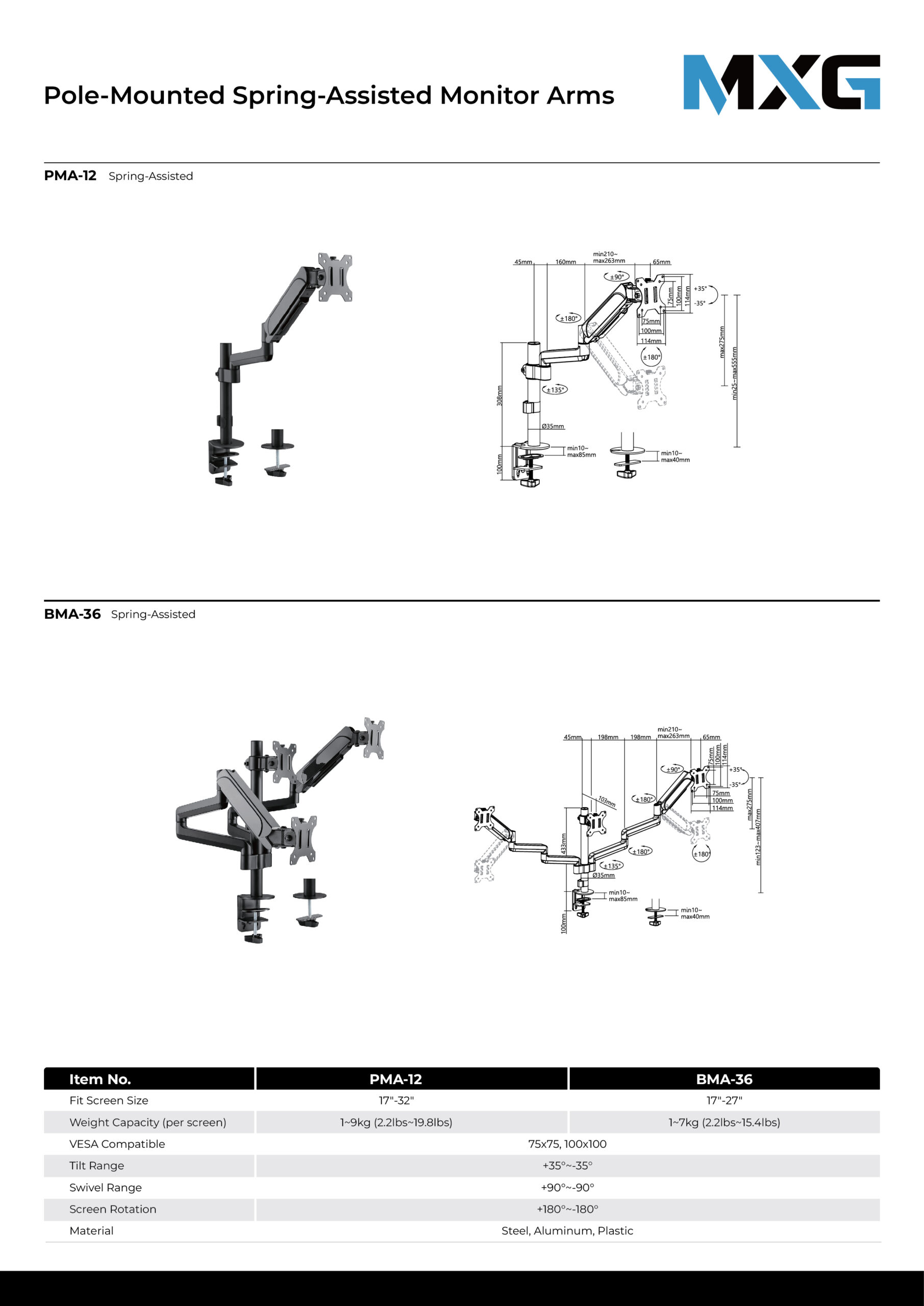
MXG PMA-12 Single Monitor Pole-Mounted Spring-Assisted Monitor Arm Specs


With its sturdy construction and effortless adjustment, the PMA-12 Single Monitor Pole-Mounted Spring-Assisted Monitor Arm holds the monitor securely above the work surface, freeing up valuable desk space. Ideal for organizing and optimizing any home or office work area. The quick-release VESA plate makes installing or removing the monitor quick and easy. Built-in cable management keeps wires hidden and aligned for a clean look. Best of all, the PMA-12 is competitively priced to add sales and profits for your business.  

Product Category: Mechanical Spring Monitor Arm
Rank: Standard
Material: Steel,Aluminum,Plastic
Surface Finish: Powder Coating
Color: Matte Black
Dimensions: 114x538x715mm (4.5″x21.2″x28.1″)
Fit Screen Size: 17″-32″
Fit Curved Monitor: Yes
Screen Quantity: 1
Weight Capacity (per screen): 1~9kg (2.2lbs~19.8lbs)
VESA Compatible: 75×75,100×100
Tilt Range: +35°~-35°
Swivel Range: +90°~-90°
Screen Rotation: +180°~-180°
Arm Full Extension: 468mm (18.4″)
Pole Height: 308mm (12.1″)
Installation: Clamp,Grommet
Suggested Desktop Thickness: Clamp:10~85mm Grommet:10~40mm (Clamp:0.39″~3.3″ Grommet:0.39″~1.6″)
Quick Release VESA Plate: Yes
USB Port: No
Multi-Media Port: No
Cable Management: Yes
Accessory Kit Package: Normal/Ziplock Polybag